In today’s digital world, data has become one of the most valuable assets for individuals and organisations. From business records and financial files to personal photos and project documents, losing data can cause serious disruption. Yet, despite advances in technology, data loss remains a common problem in 2026.
Understanding what causes data loss—and how to prevent it—is the first step towards protecting your digital life.
What Is Data Loss?
Data loss occurs when information stored on a device or system becomes inaccessible, corrupted, deleted, or permanently destroyed. This can happen suddenly or gradually, and in many cases, without warning.
The impact ranges from minor inconvenience to major financial and operational damage, especially for businesses that rely heavily on digital systems.
Major Causes of Data Loss in 2026
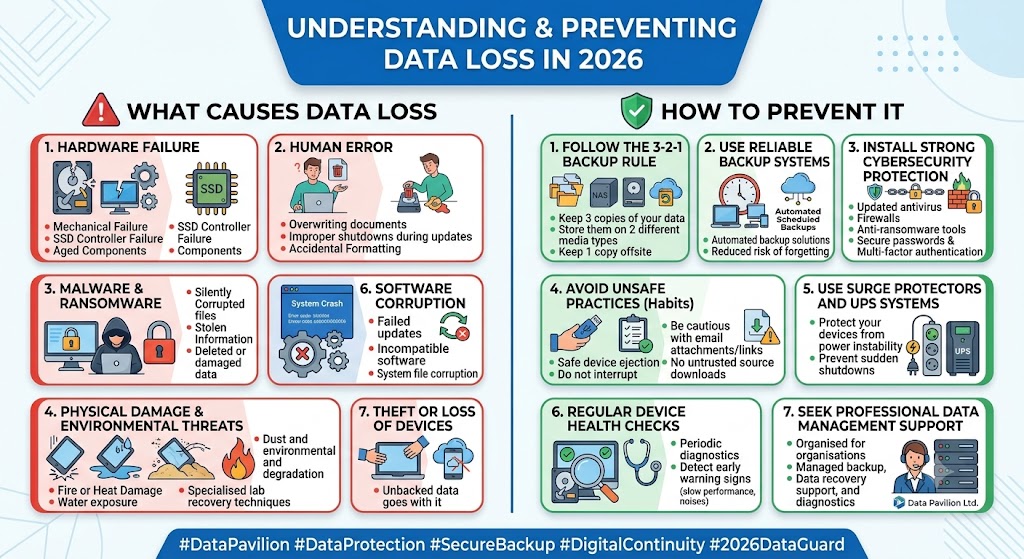
1. Hardware Failure
One of the most common causes of data loss is hardware failure. Hard drives, SSDs, flash drives, and external storage devices all have limited lifespans.
Over time, components wear out, leading to:
- Bad sectors on hard drives
- Mechanical failure in spinning disks
- Controller failure in SSDs
- Sudden device non-responsiveness
When this happens, stored data may become partially or completely inaccessible.
2. Human Error
Mistakes remain a leading cause of data loss. These include:
- Accidental deletion of files or folders
- Formatting the wrong drive
- Overwriting important documents
- Improper system shutdowns during updates
Even experienced users are not immune to human error, especially when working under pressure.
3. Malware and Ransomware Attacks
Cyber threats have become more sophisticated in 2026. Ransomware attacks, in particular, can encrypt entire systems and demand payment for restoration.
Other malicious software can:
- Corrupt files silently
- Steal sensitive information
- Delete or damage stored data
Without strong cybersecurity measures, both individuals and organisations are vulnerable.
4. Power Failure and Electrical Surges
Unexpected power outages or electrical surges can severely damage storage devices and interrupt file operations.
Common outcomes include:
- Corrupted files during saving or transfer
- Damaged storage sectors
- Operating system failure
This is especially risky in environments without proper surge protection or backup power systems.
5. Software Corruption
Operating system crashes or application errors can lead to data loss. This may happen due to:
- Failed updates
- Incompatible software installations
- System file corruption
- Bugs in critical applications
When the system fails to boot properly, accessing stored data becomes difficult or impossible.
6. Physical Damage
Devices are still vulnerable to physical harm, including:
- Drops and impact damage
- Water or liquid exposure
- Fire or heat damage
- Dust and environmental degradation
Physical damage often requires specialised recovery techniques in a professional data laboratory.
7. Theft or Loss of Devices
Laptops, phones, and external drives can be lost or stolen. In such cases, not only is the device gone, but all unbacked data goes with it—unless proper cloud backup or encryption is in place.
How to Prevent Data Loss
While data loss cannot always be avoided, it can be significantly reduced with the right precautions.
1. Follow the 3-2-1 Backup Rule
This is one of the most reliable strategies:
- Keep 3 copies of your data
- Store them on 2 different types of storage media
- Keep 1 copy offsite (cloud or remote location)
This ensures redundancy even if one system fails.
2. Use Reliable Backup Systems
Automated backup solutions reduce the risk of forgetting to save important files. Cloud backup services and scheduled local backups ensure your data is always up to date.
3. Install Strong Cybersecurity Protection
Protect your systems with:
- Updated antivirus software
- Firewalls
- Anti-ransomware tools
- Secure passwords and multi-factor authentication
Cybersecurity is now a core part of data protection.
4. Avoid Unsafe Practices
Simple habits can make a big difference:
- Always eject storage devices safely
- Avoid interrupting system updates
- Do not download files from untrusted sources
- Be cautious with email attachments and links
5. Use Surge Protectors and UPS Systems
Protect your devices from power instability using:
- Surge protectors
- Uninterruptible Power Supply (UPS) systems
This helps prevent sudden shutdowns and hardware damage.
6. Regular Device Health Checks
Periodic diagnostics of storage devices can detect early warning signs such as:
- Slow performance
- Unusual noises (HDDs)
- File access delays
- Frequent system crashes
Early detection can prevent total failure.
7. Seek Professional Data Management Support
For organisations, relying on professional data services ensures stronger protection. Services such as managed backup, data recovery support, and storage diagnostics reduce the risk of irreversible loss.
Key Takeaways
Data loss is no longer just a technical issue—it is a business and personal risk. In 2026, where digital dependency is at its peak, prevention is far more cost-effective than recovery.
By understanding the causes of data loss and applying simple preventive measures, individuals and organisations can significantly reduce risk and ensure continuity.
At Data Pavilion Ltd, the focus remains on helping clients protect, manage, and recover their valuable digital assets through secure and professional data solutions.